Showing posts with label Technology. Show all posts

Monday, May 9, 2016

Using Infographics in Class

Have you thought about having students develop infographics in your classes?

Having students create infographics supports the skills identified in Bloom's Taxonomy and can be used to develop and assess the abilities of MCNY students:
  • Ability 2 - to communicate effectively through reading, writing, listening, speaking and other modes of expression.
  • Ability 3 -To develop an appreciation of art and aesthetic awareness.
  • Ability 6 - to describe social, natural and technological systems, using methods specific to the humanities and the social and natural sciences.
  • Ability 8: - to use mathematical reasoning to analyze the world.
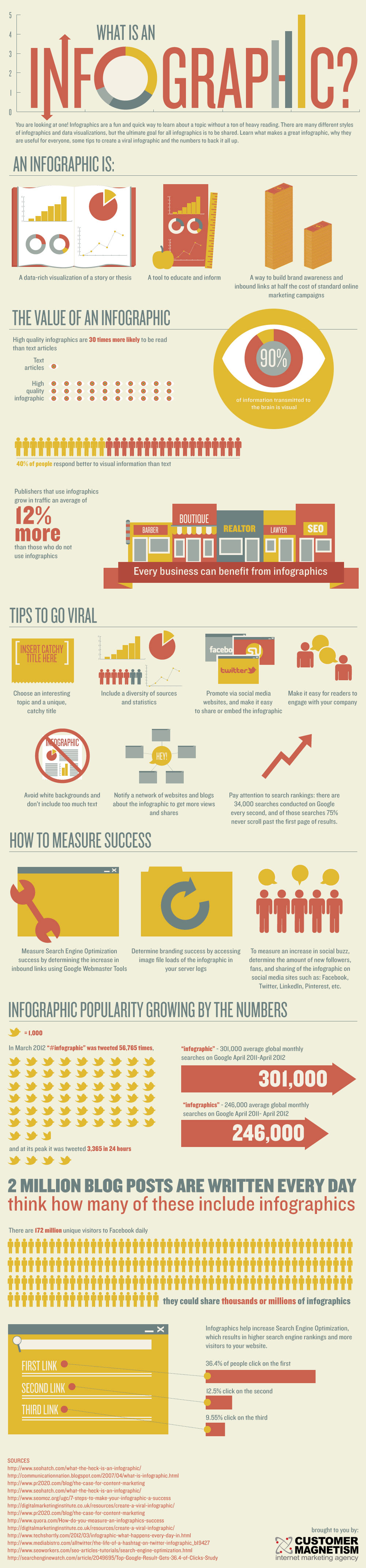
What's an infographic?

What is an Infographic?Created by Customer Magnetism.

You might begin with using infographics to display information to students (check out the Daily Infographic or the New York Times for infographics you might use in class).

An assignment that has the students design their own infographics and present them in class (in-person or online) can help develop analytical, communication, technological and visualization skills. Projects can be created by individuals or groups and can be an interactive component in a hybrid or web enhanced course. For example you might ask students to develop an infographic on a social problem, the history of their agency or to display their research findings in their CA. These can be presented in class or posted online for discussion.

Check out Vennage a free resource for making infographics, which I have used for student assignments and have gotten outstanding results.

You fight find the following resources useful:
Infographic: Capabilities Created by Infographics in Education | Venngage
 

Sunday, March 30, 2014

Telecommuting Students into Class

I recently had a experience where a student had an injury that prevented her from physically attending class. Since I had been offering students the opportunity to use skype for online meetings, she thought we might be able to use facetime to have an online meeting. I then began thinking about having her telecommute into class and came up with several options.

Since I use the classroom computer for moodle, lecture slides and videos, I could not use the class computer to communicate with the student. Classroom computers also do not have cameras or microphones. But both myself and students have smartphones and tablets.  Also since I have my lecture slides with embedded videos on moodle and open them during class so that students can follow on their phones, tablets or laptops as an option to viewing the projected images, a person at home could also follow.

Hearing the lecture and discussion might require two pieces of equipment such as a phone for the audio and a tablet or computer for moodle. If students only have the equipment for the audio, they would essentially be the same as a conference call and could hear what occurred in class. They could review slides and videos afterwards.

If there is only one student, I could connect to them with my ipad using either skype or facetime.  I would probably not use the video because I doubt if I could project the screen clearly and I move throughout the classroom. It is my understanding that skype allows group calls but I have not been able to figure out if this works with ipads. If there are multiple students who might require this, maybe members of the class can use their phones to connect them. Skype uses the school's wi-fi conenction so that such students do not need to pay for their telephone calls or use their data plans.

This option also requires faculty to make some policy decisions about who and when such actions take place. For example, it might only be used for those with documented medical needs that prevent them from attending class.  It might also require permission of other class members during planned discussions.

I would like to hear from others who have used or have ideas about using technology strategies to help students participate in classes when they are unable to physically attend.

Tuesday, November 26, 2013

Using Pinterest for Educational Projects


Pinterest (pinterest.com) is a social networking site through which users share their favorite images of interests, hobbies, and activities.  It is estimated to be the fastest growing and third largest social media site, only behind only Facebook and Twitter, with over 48 million users as of April 2013. According to the Pew Internet and American Life Project, 12% of online adults and nearly a fifth of online women (19%) use Pinterest. 

The user space is the equivalent of virtual bulletin boards, within which one can pin or collate images from all across the Internet. Users can have multiple boards for different topics or themes. Postings are called “pins” and users can either use Pinterest buttons embedded by owners in their web sites or a “Pin It” button in their web browser to create a pin. Each pin includes a caption, a short descriptions of the image, and links back to the site from which it originated. Other users can comment on pins and also repin items to their own boards.

While many hobbyists and retailers use pinterest to collate pictures of projects from the internet, pinterest can be used to support teaching and educational functions. Students can use it to collect resources for a project by pinning them to a board, adding captions and writing comments. These boards can be public or private. For a private board the only person who can see the board is the creator and individuals who are invited. Thus a student could collate a collection of pictures and resources that might only be available to a teacher or other students. Pinterest boards can also be group boards that allow all the members of a group to work together on a board that can either be public or private. Basic directions for setting up a pinterest boards can be found here.

All kinds of student projects can be supported by pinterest. For example, an earth science class might ask students to prepare presentations on different weather phenomenon and each student can create a board for their topic and share it with the class. Current events lend themselves easily to pinterest projects. Student assignments may want to include directions for a certain number of original pins rather than them simply repining from other boards. Students may be required to do in-class or online presentations using their pinterest boards.

In Purpose 5 Systems, MCNY Human Services students are required to develop a website for education, prevention and outreach. The development of a pinterest board can provide a preliminary step to this project and can be developed in an earlier purpose. For example, in Purpose 2 Systems, I  have my students develop and post to moodle fact sheets with internet images and resources based on their readings in Trattner's From Poor Law to Welfare State. This assignment could easily use pinterest boards. Students can provide captions that explain the images used and other class members may be required to comment. For additional ideas you might wish to look at  Using Pinterest in Education.

While learning management systems used in schools may be limited to use by students, faculty and staff, pinterest boards can be shared with others. A Constructive action project might include the development of a a board with community resources that could be linked to an agency's web site.
 
Faculty can use boards to to collect and share resources with others. For an example of these, check out my boards:

The first board is clearly to collect resources for myself and share with other faculty. I often find myself going to my pinterest board to find to locate a resource. The last three are listed as resources for students on all my moodle shells and the last two boards were in response to students asking me about books to read or films to use in presentations or their agencies.

There are some limitations for using pinterest for projects. For example not all web sources have good quality items that can be pinned. I have sometimes been known to find a picture from one website and use a URL in the caption to go to another site. I often had to do this with the book and film boards since I wanted a picture of the book or film, which did not appear on the page with the review or article about the material. Also pins can not easily be rearranged on a board, so it requires planning and or sometimes removing and repining. Captions are limited to 500 characters so that students have to write clearly and succinctly, but it is significantly more characters than a twitter posting. Students will have to add a "Pin It" button to their web browser or use the "Pin It" app on their phones and tablets. Faculty will need to decide if they want to set up a class account that can have a board for each student or group. Faculty will own these boards, will need to add students as pinners using student email and can delete them these boards. If students are required to have individual accounts they can be asked to add faculty to their boards as editors and a method will need to be devised so that other members of the class can view the boards. If others are required to view the boards online, I suggest using a moodle forum to have students post the links to their project boards. And currently analytics are only available for business accounts.

Pinterest offers a tool for helping students and faculty to collate and share resources from across the web and is only limited by one's imagination. I would love to hear how others are using pinterest in their classes.

Tuesday, April 2, 2013

Using Skype to Increase Student-Faculty Interaction

Has this happened to you? You sit in your office for three hours between classes and no one shows up for office hours. Then five minutes before class students show up and want to talk with you about their papers or assignments.

Now it is true that our students lead very busy lives with family, school and work responsibilities. In addition, they are all commuter students so that none of them reside on campus and can simply pop over to our offices.

So how do we increase the opportunities for them to have discussions with faculty. Email offers some opportunity for additional interaction, but email is not a totally adequate solution for holding deep academic discussions. It is possible to have a back and forth discussion, but it is a longer process and is dependent on writing skills. Text might also offer some options, but I don't text. :)

This semester I am offering students the opportunity for online Skype appointments. Skype is a free internet video conferencing service that allows both individual and group web conferencing. It requires all the parties to have a webcam, microphone and internet connection and runs on smart phones, tablets laptops and desktops. I have set up a separate account for my school work and only open it when I am expecting to meet with a student. A premium account is required hold group videoconferencing. And if you are in your pajamas or haven't taken your shower yet, you can turn off the video portion and just talk online. This allows faculty and students to talk without disclosing personal phone numbers.

I have been opening this account during my real life office hours and leave it on in the background. Since my office computer has neither a webcam or and microphone, I use my ipad. 

To increase opportunities for students, I have also been offering them the opportunity to email me so that we can set up a specific time and place for us to have a skype appointment. Again I open my school skype account when I have a scheduled meeting. I am not available 24/7 on skype, but have blocks of time when I am willing to talk with students in addition to my posted office hours. So when they ask if I have office hours on Wednesday, I can say "No, but I can talk with you on Wednesday between 3-5 pm on skype. Would you like to make an appointment?"

So far no students have taken the opportunity. I wonder if anyone else has been using skype to increase their office hours.

Friday, May 4, 2012

Are You Tired of Powerpoint?

PowerPoint is a necessary evil for teaching in a technology enabled classroom. And if you don't believe me, read Tufte. E. (2009). PowerPoint Is Evil. Power Corrupts. PowerPoint Corrupts Absolutely.(http://www.wired.com/wired/archive/11.09/ppt2.html) Ever since Adobe Persuasion was discontinued I have been forced to use Powerpoint. I have even tried using Pages on my Macintosh and iPad. 

For the last couple of years, I have been making Quicktime videos of my lecture slides and placing them in the Blackboard or Moodle shell so that students can review them. I am often asked why don't I just create handouts. I don't for several reasons. I believe that....
  • students are responsible for their own learning.
  • the ability to identify and conceptualize is important for students to develop and a tool for doing this is note taking
  • active learning involves "activity" such as writing notes, hi-lighting, typing, etc.
Students are able to stop and review slides as many times as they want. And in fact this makes for more interesting interaction in the classroom, since students are not trying to be human xerox machines, copying every word on every slide. Many no longer take notes in class and are fully engaged in listening and discussing.

But it is a long process to make the original PowerPoint slides, turn them into Quicktime videos and upload them to Moodle. Every time I make a change in a slide set used in class, I have to make a new movie, remove the old file from Moodle, and upload the new file, and then make sure that it works.

So what if some presentation software came along that was could be edited online so that you only need to place a link or embed it in a Moodle shell. Well it does exist, meet Prezi (http://prezi.com/).  If I make a change in my Prezi slides, all I have to do is save it in my Prezi account. (Which it does automatically while I am editing.) When the student clicks on the link or the embeded Prezi, they see the most recent version. No need to upload, download or redo movies. Not only that I can import my large collection of PowerPoint slides into Prezi, which also easily imports resources such as images and videos from the web. Prezi also allows collaboration through shared editing so that students could work on a presentation together. Purpose Faculty might jointly create a Prezi that could be used by all.

And best of all, it is free to students and faculty with .edu email accounts. Prezi also has an iPad app. It is easy to learn and comes with some very suitable templates. A full series of tutorials and cheat sheets can be found at http://prezi.com/learn/.

I gave my Purpose 8  Constructive Action students the opportunity to use Prezi instead of PowerPoint for their final in-class presentations and the Prezi presentations did seem more interesting and dynamic. Prezi also has the potential of allowing students to make online presentations without the difficultly of creating, uploading and downloading slide shows. All they have to do is post their link or embed their Prezi into a Moodle forum and the other members of the class can review the presentation and comment.

To learn more about Prezi...


Saturday, April 21, 2012

Using Social Media for Project Publication


I’m eager to share the success and hurdles I’ve experienced using technology in new ways this semester. I am experimenting with social media as a teaching tool in my Critical Thinking & Writing through Literature class. While launching this social media element was daunting to me, I was impressed with the successes reported from other institutions, as well as our own Lynn Sally. 

Most of my class readings and resources explore how great writers across time use literary devices and insight to speak out as critics of corrupted leadership and narrow thinking. That is a tall order for any student, and quite a new practice for many of our students. As this is a course I regularly teach, I am always keen to explore how the delivery of content and expectations for engagement radically shape the depth of critical inquiry around a topic or reading.  

This is best illustrated through our “Signature Assignment” (self-directed learning project), which focuses on social justice issues. In the past, these culminated in class discussion and PowerPoint presentations.
I have grown more and more frustrated with the “dead-end” feeling of this presentation format. For all of their great probing and creation of meaningful testimonies to individuals who are boldly “speaking truth to power,” the final product was limited to those in the room and a PowerPoint file… now collecting dust at the bottom of my desk drawer. This format fanned their inspirations only to become yet another project that died at the classroom door.

Enter Social Media. This spring term, for our Truth to Power projects, students
  • chose one individual or small group that they think played a significant part in 2011/2012 in helping to “re-write” how we think about power, institutions of power and inequality
  • used Bloom’s Taxonomy- Levels of Learner Knowledge to fuel their critical inquiry.
  • were required to use Twitter to engage with class material outside of class and gradually to engage with their topic through Twitter.
The final for this project was a multimedia analysis of their projects distributed back into the world via another social media, i.e. YouTube, Blog, Storify, Tumblr, Prezi, Paper.li, etc.

Resistance was strong at the beginning, as students could not grasp the relevance of the social media component and/or were intimidated by the new online platforms. But truly, in week 4, when 15 students posted on Twitter their deep reflections to our Plato reading, my jaw dropped with a “holy shizzle, this works.” Of course, our next class session was totally radicalized by the dynamic on-line feed that proceeded our meeting.

The most incredible shift, however, came just this week, when students presented their published analysis of their topics to the class. Not only were we already invested in one another’s topics, but the testimonies were beautifully crafted, the writing was (mostly) very strong, and the class was amazingly empowered by becoming directly involved with a movement because of their online publication. (In fact, tears were shed.)
Here are links to two projects:
(This work was made accessible to general public by the students)

They got it. They got that the potential impact of their writing is powerful, that it creates ripple effects around the world and can influence someone (or a movement) without them even knowing. They are taking new-found responsibility for their writing. Never before in my teaching have I seen my students grasp the immediacy and far-reaching impact of their writing and language so well. 

Here is one success story of a course- students- being transformed by paying attention to relevance of course material, pushing comfort levels, bridging unforeseen connections and building peer community outside of the classroom. In an email today, a student wrote:
I found the Signature Assignment to be an eye opening experience. After I fully understood what the project was about, I realized how this assignment was truly innovative. Never did I think Twitter would be an integral part of my college studies. I especially enjoyed using social media at the completion of the project by sharing with the online community. It was interesting to research a group who was making a change in the world. During the time of the Arab Spring, I followed the coverage and thought I fully understood its purpose. Little did I know what was shown on television was a one-sided filtered agenda of what was happening. Your project exposed me to a grassroots revolution from the ground up. It brought to my awareness that true change can really happen if one is determined enough to speak up and speak out. And it is a sign of our times that social media can facilitate the mission statement of any cause. This class component enriched my learning experience and I'm sure it will do the same for future students.

I will be updating this assignment by
  • giving more directed prompts for Twitter posts
  •  giving more demonstrations for using Bloom’s for guiding critical inquiry
  • assigning project benchmarks that link directly to in-class learning objectives
  •  share examples of past student publications to help make a rather abstract assignment more concrete and inspiring
I’d love to hear any feedback and suggestions for moving forward!

Parker Pracjek, Academic Coordinator, Learning Enhancement Center
Tuesday, April 17, 2012

Incorporating Tech into the Classroom

Dedicated adjunct faculty member and good sport Glenda Perreira shares her experiences incorporating technology into the classroom.


Perreira teaches and developed the curriculum for one of the common classes at MCNY: MIS CC 130 - Computer Applications. If your students have strong power point skills, she may be the one to thank.

In this podcast, Perreira shares with faculty some of the benefits of using tech in the classroom, her perspective on how to introduce it, and how to guide those new users.

Audio quality is a little rough for our first take, but hopefully this will be the first of many guest voices from faculty!

If you're having trouble with the embedded player, you may try this link directly:

http://soundcloud.com/diwata/glenda-perreira-gives-advice

Thank you, Glenda.

Monday, April 16, 2012

Using Social Media for Social Change

At the regional PCA/ACA this week, I presented a paper on my experiment with using Twitter in a Common Curriculum Course, Critical Thinking & Writing through Literature, and a BAUS first semester course, Self-Assessment through Writing and Technology.  I presented my paper, “Writing & Thinking in 140 Characters or Less:  Twitter as Purpose-Centered Education,” on a panel with a Carol Bernard who presented on a study she did using a Facebook teacher page and Lindsay Illich who presented on using Word Clouds to help teach composition. 

You can create a word cloud out of a text through the website www.wordle.net, and the image that is produced will show you the primary words used in a particular text.  This could be an interesting exercise for analyzing the differences between two political speeches, for example, and it made me think that Word Clouds would be a great inclusion in the Public Speaking common curriculum course which is currently being developed at my college.  It is exciting to see other educators’ use of technology to enhance the classroom experience, and I was interested in the ways that colleagues have thought so deeply about how to teach students to think and write through these technologies.  It also got me to thinking about whether I practice what I preach.

As MCNY promotes Purpose-Centered Education that fosters students to become socially engaged change agents, this seemed a logical extension to move towards using Twitter and social media more broadly for productive ends.  Social activism does not have to happen simply in the traditional “internship” model on which the college – in the past – has been based.  As a cursory glance at revolutions around the world indicate, social media has been central to many – if not most – of our modern movements for change. 
This semester, I assigned Twitter for the Critical Thinking Signature Assignment, and asked the students to create a project called “Using Social Media for Social Change.”  They were asked to research a topic that was either 1) connected to their Constructive Action or 2) of political or personal interest to them.  They were then asked to follow that topic through their involvement with Twitter, by following leaders and organizations, retweeting, and generally getting involved in a topic through social media sight.  As they researched, read, and got involved, at the end of the semester they are asked to use social media to sum up their findings, and to recirculate that through a social media sight such as YouTube, Tumblr, Prezi, or a host of other options.  The idea is that their research would then be recirculated through the social media that they did their project.

I realized, perhaps too late, that asking students to bring about some type of social change – despite the medium – is daunting.  It’s not that using Twitter or using Twitter for productive ends is beyond students, but rather that I don’t know if I succeeded in breaking that down – just like one would break down a research paper in a composition class – into steps.  Some of the questions that have arisen include:  how do we get students to use social media critically?  What type of additive assignments can be given to help students establish, research, and develop their topics? In short, how do we get students to “start a revolution” or movement online?
Here are some ideas of how I will update this assignment in the future:

1)       Suggest Topics.  Though it may seem limiting, I realized that giving students possible topics may be useful for some.  “If you could change the world, what would you change?” question is admittedly both daunting and seemingly impossible.  Suggesting topics will give options to those students who find difficulties coming up with their own.  It also allows us to connect to what is happening politically and socially both locally and globally, and to place our conversations in class in a larger context.  The topics can give students options, and can help them brainstorm their own take on the suggested topics.
2)      Show Examples.  I tried to model in class how I was using social media for productive ends by showing students who I was following, and what I had learned about current events or topics of interest to me through Twitter.  But a don’t know if this was entirely successful.  In hindsight, I think a list of concrete examples of others using social media for social change would have helped students understand the concept.  These concrete examples could include
a.       celebrities who use Twitter to support causes;
b.      individual or organization who use  their Twitter feeds for activism;
c.       examples of viral videos, etc. that have helped broadast social issues;
d.      online “boycotts” and “buycotts” as strategies for supporting issues important to students as consumers;  
e.      examples of revolutions and movements around the globe broadcast on social media 
This list could, in turn, be placed on a collaborative editing cloud such as Google Docs, so that students and instructors could contribute examples that they come across.

It may be the end of the semester, but it’s never too late to think about and implement changes in the classroom.  I will run this by students this week in class, and see what they think.  I am sure they will have suggestions that will improve the classroom for all.

Monday, March 5, 2012

Twitter How To

When Twitter first came out, I thought it marked the end of Western Civilization.  No doubt many of you feel the same way.  Skepticism aside, I have been using Twitter in my classed, and to great results. 

Here's an easy tutorial I wrote for new Twitter users to log in and get going.  You will discover that the exchange of information on Twitter is boundless, practically instantaneous, and totally inspiring.  Feel fre to copy and share this if you want!

HOW TO GET STARTED ON TWITTER!
1) Go to http://www.twitter.com/.
2) Go to Field: “New to Twitter? Join Today!” and fill out the necessary information. BE SURE TO WRITE DOWN YOUR LOGIN AND PASSWORD IN YOUR NOTEBOOK FOR THIS CLASS.
3) “Username.” Think of a creative, original, unembarrassing name for your Twitter Account. Your Username will be in your URL, so pick something that’s easy to remember and type.
4) Click on “Next Tab: Interests” and, if you want, select your interests.
5) Click on “Next Tab: Friends,” enter “CritThinkWrite” and select “Search.” Click on “Follow” to follow my Twitter account.
5) Go to your Email and activate the account via the link.
6) Click on your Twitter account icon in the upper right hand corner. In the drop down menu, select Settings.
7) Go through EACH Tab menu to update and personalize your account. Take special note of the following:
• Tweet Privacy (under “Account”). This allows ONLY those who you have approved to be able to read your Tweets.
• Twitter with Text Messaging (under “Mobile”). If you can send text messages from your phone, I STRONGLY recommend you activate this feature. This way, you can post while on the go!
• “Notifications” Tab: You may want to consider deselecting receiving texts every time you get a Twitter, though keeping it active with DM will help you stay connected. Check out the right column for other features.
• Picture (under “Profile”). Add an image or your own photo.
• Bio (under “Profile”). Enter a bio.
• Select a Theme (under “Design). Customize your Twitter account!
8) Click again on your Twitter account icon (upper right hand corner). Scroll down to “Write your First Tweet!” in the right column. Write your first tweet and post.

Tuesday, February 21, 2012

Faculty Sharing Resources, Connecting to Social Media for Social Change

A colleague forwarded me a short article about an African Chief who is using Twitter to “to help solve problems and maintain order in his Kenyan village” (http://mashable.com/2012/02/19/african-twitter-peace/).  His Tweets have helped prevent crimes, offered practical resources such as job openings as well as “inspiring” messages to his community.  This came at an opportune moment as it serves as a practical example of what I am asking students to do in my Critical Thinking & Writing through Literature course.
I Retweeted the post (@CritThinkWrite), and reminded my students that they should begin following leaders, activities, and organizations either related to their Constructive Action projects or a topic of interest to them.  For this course, students are asked to maintain a Twitter account and for the first half of the semester, they are given prompts every week that relate to the course material, make connections between their courses, and/or apply what they are studying in their real world experiences. 
For the rest of the semester, they are asked to use Social Media for Social Change, and to track their progress through a Trending Topic: #socialmediasocialchange.  This includes researching initiatives and projects, communicating with leaders, and becoming involved onlines with communities.  For their final, they will create a presentation, report, or other mixed media project that is then distributed back through social media such as YouTube, Tumblr, Prezi, or any other user generated source.  This way they can distribute their findings back to the communities they have studied and worked with, while using social media to do so.
In the article, I was interested in the author’s suggestion that readers post “the most interesting or unexpected examples of social media use that you’ve heard of” in the comments section.  I am interested in this, too, and will show students this in our next class and ask them to share their projects with a larger community of interested readers by inviting them to post a comment to this article.  One reader who posted a comment mentioned she has seen cell phone usage increase even in remote areas, and that those with phones serve as “information multipliers” for the rest of the community.  While some would argue the technologic divide alienates, here is an example in which it unifies.
In this sense, social media is returning users to community-centered information exchange, and that that creation of community is something that is sorely lacking in our modern age.  In Bowling Alone, Robert Putnam has (now famously) argued that social capital has declined in America since the 1960s, and continues to do so across a broad range and staggering number of categories.  While we may blame the insular nature of constantly being “plugged in” as a contributor to the decline in social capital, we can start to harness its potential for positive, real world effects.  I see others are doing this around the world, too.  Luckily, we can be friends on the World Wide Web.

Monday, February 6, 2012

Faculty Office Hours

With all the work that comes with designing innovative lesson plans, incorporating technology into your pedagogy can often feel like an added burden that requires time and expertise you think you may not have.   Beginning this semester, I will hold Faculty Office hours (for Full Time and Adjuncts) on Mondays from 4:30 to 6:30 to discuss questions, ideas, or concerns you have about incorporating technology into your classes.  I am not a technology expert, nor am I an education expert, but rather I envision these office hours as a time carved out of our days when we can meet and discuss pedagogy, how to deliver course content effectively, and, in the spirit of Purpose Centered Education, put our ideas into action.
Incorporating technology can be scary, difficult, and feel time consuming, but the more I've used it the more I realize it makes my job easier (really) and classes more dynamic.  So if you need some help or just want to talk, please come see me.  You can email me, too, and if you have questions that are outside my expertise, I will direct you to a professional.  In the meantime, here's an ongoing list of resources that faculty have used in their classes that may inspire you.  This is a Google Doc, so feel free to add your techno resources to this list!  Thanks to Adele Weiner and Diwata Fonte for contributing to this document:  https://docs.google.com/document/d/1_i8yV0hietQqP4xW4o8-lWgPOFFNOhW2KJ4LbB_KmqU/edit
Faculty Office Hours
Monday:  4:30-6:30
Office:  1246
Extension:  2439
Feel free to come by or phone!

Monday, November 21, 2011

Using Twitter to Help Students with Study Habits

A student sent a Tweet to me asking about effective study habits. I used that as a Twitter assignment for the week, and asked students to locate and Tweet at least 3 sources they found about effective study habits, as well as construct at least 3 original tweets about what study habits work for them.

The result? They shared resources, had conversations about what worked for them, and connected to a broader community about how to become more effective students.

Here’s examples of what they shared:

• “I set aside time specif. to study. If I leave study time vague, I am apt to push it until the evening when there are too many distractions.”

• “I need a clear head to study. This means I have eaten, am naturally awake/had coffee to keep me alert. Set my phone to silent.”