Showing posts with label Multi-Media Education. Show all posts

Monday, May 9, 2016

Using Infographics in Class

Have you thought about having students develop infographics in your classes?

Having students create infographics supports the skills identified in Bloom's Taxonomy and can be used to develop and assess the abilities of MCNY students:
  • Ability 2 - to communicate effectively through reading, writing, listening, speaking and other modes of expression.
  • Ability 3 -To develop an appreciation of art and aesthetic awareness.
  • Ability 6 - to describe social, natural and technological systems, using methods specific to the humanities and the social and natural sciences.
  • Ability 8: - to use mathematical reasoning to analyze the world.
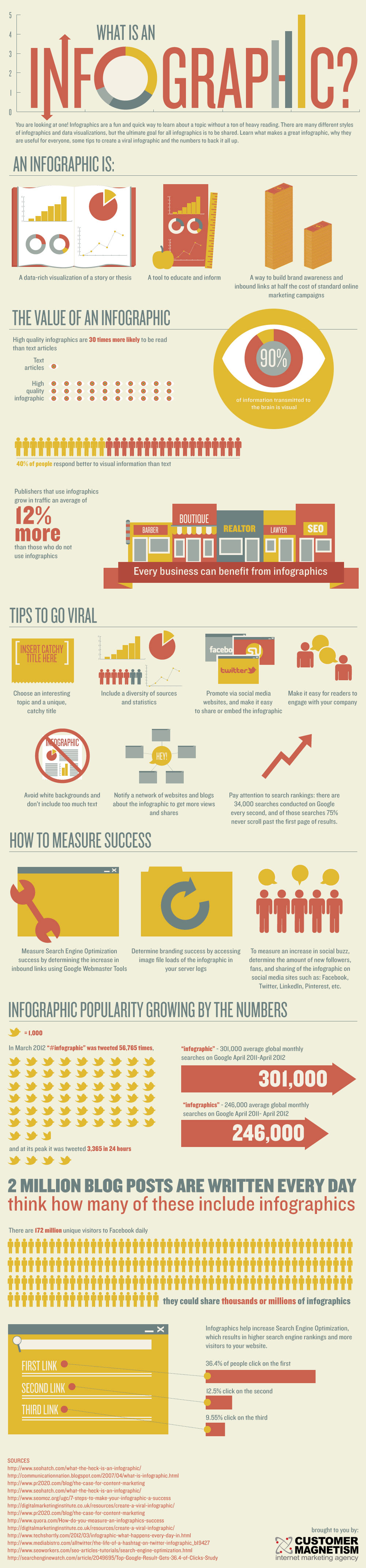
What's an infographic?

What is an Infographic?Created by Customer Magnetism.

You might begin with using infographics to display information to students (check out the Daily Infographic or the New York Times for infographics you might use in class).

An assignment that has the students design their own infographics and present them in class (in-person or online) can help develop analytical, communication, technological and visualization skills. Projects can be created by individuals or groups and can be an interactive component in a hybrid or web enhanced course. For example you might ask students to develop an infographic on a social problem, the history of their agency or to display their research findings in their CA. These can be presented in class or posted online for discussion.

Check out Vennage a free resource for making infographics, which I have used for student assignments and have gotten outstanding results.

You fight find the following resources useful:
Infographic: Capabilities Created by Infographics in Education | Venngage
 

Monday, November 3, 2014

FERPA, Teaching and Social Media

Originally prepared and presented to Faculty of the Audrey Cohen School for Human Services and Education.

Monday, August 27, 2012

Finding Online Videos

I  have been collecting a list of resources for locating on-line videos that can be used in class or viewed by students outside of class.  On-line films/videos can also serve as the basis of an on-line class when in-person classes have been canceled because of weather, rescheduled around holidays, or the professor is unavailable in-person. Links to the video can be placed in the learning management system (moodle) or embedded in the discussion forum, with discussion topics or questions. I always have one or two video assignments available on moodle just in case I need them. 

Educational Video and Documentaries
News (All the major TV and cable news networks have on-line video resources)
Broadcast Television
Internet Videos  
Miro is a free open-source video and music player. There is also a Miro Video Converter, a simple way to convert almost any video to MP4, WebM (vp8), Ogg Theora, or for Android, iPhone, and more.

This is not an exhaustive list of all the resources available. Please feel free to share your video resources.

Tuesday, May 8, 2012

Resources for Teaching with Technology

Reposted from an email sent to all MCNY faculty on 5/8/12.

A couple of summers ago I developed a Faculty Development Workshop on creativity to help faculty incorporate online resources into their classes and Moodle shells. As we move forward with our Strategic Plan and our efforts to provide significant course content online, this becomes more important.

At that time I collected a list of web resources that could be used across the MCNY curriculum and placed them in a Moodle shell that was available to all the workshop participants. I still use many of these resources and have added others over the years. Of course some of them have morphed into something different than they were, totally disappeared, or been replaced. New ones have been developed. But I keep finding myself going back to that old Moodle shell to find something.

So I thought about updating this resource list to make it more accessible and since I wanted to try out my new Pinterest account (the fastest growing new social media network), I set up a Pinterest board on "Resources for Teaching with Technology". Piniterest boards are like bulletin boards where you can "pin" pictures from all over the web and add some descriptive text. When a visitor clicks on the picture, they are taken to the original source of the picture. I have also set up some other boards that can be used in my teaching ("Human Services Interest Board", "Documentary Films - Society and Human Services" and "Books Worth Reading"). The film and book boards are in response to questions that students often ask about seeing additional films or recommendations for books.


Please feel free to check out the Resources for Teaching with Technology board at: http://pinterest.com/draweiner/resources-for-teaching-with-technology/.

You can like items, "repin" them to your own boards, follow a board, or write comments. I would be interested in hearing about the creative ways you are using some of these resources. Please let me know about other resources you find useful. Unfortunately not every resource can be pined since some of the web sites do no have usable photographs, which is the main element of a pin. Groups can develop boards since the owner of a board can add others who also have the ability to pin to that board.

We can also talk about how to use Pinterest itself as a teaching tool. Happy pinning.


Friday, May 4, 2012

Are You Tired of Powerpoint?

PowerPoint is a necessary evil for teaching in a technology enabled classroom. And if you don't believe me, read Tufte. E. (2009). PowerPoint Is Evil. Power Corrupts. PowerPoint Corrupts Absolutely.(http://www.wired.com/wired/archive/11.09/ppt2.html) Ever since Adobe Persuasion was discontinued I have been forced to use Powerpoint. I have even tried using Pages on my Macintosh and iPad. 

For the last couple of years, I have been making Quicktime videos of my lecture slides and placing them in the Blackboard or Moodle shell so that students can review them. I am often asked why don't I just create handouts. I don't for several reasons. I believe that....
  • students are responsible for their own learning.
  • the ability to identify and conceptualize is important for students to develop and a tool for doing this is note taking
  • active learning involves "activity" such as writing notes, hi-lighting, typing, etc.
Students are able to stop and review slides as many times as they want. And in fact this makes for more interesting interaction in the classroom, since students are not trying to be human xerox machines, copying every word on every slide. Many no longer take notes in class and are fully engaged in listening and discussing.

But it is a long process to make the original PowerPoint slides, turn them into Quicktime videos and upload them to Moodle. Every time I make a change in a slide set used in class, I have to make a new movie, remove the old file from Moodle, and upload the new file, and then make sure that it works.

So what if some presentation software came along that was could be edited online so that you only need to place a link or embed it in a Moodle shell. Well it does exist, meet Prezi (http://prezi.com/).  If I make a change in my Prezi slides, all I have to do is save it in my Prezi account. (Which it does automatically while I am editing.) When the student clicks on the link or the embeded Prezi, they see the most recent version. No need to upload, download or redo movies. Not only that I can import my large collection of PowerPoint slides into Prezi, which also easily imports resources such as images and videos from the web. Prezi also allows collaboration through shared editing so that students could work on a presentation together. Purpose Faculty might jointly create a Prezi that could be used by all.

And best of all, it is free to students and faculty with .edu email accounts. Prezi also has an iPad app. It is easy to learn and comes with some very suitable templates. A full series of tutorials and cheat sheets can be found at http://prezi.com/learn/.

I gave my Purpose 8  Constructive Action students the opportunity to use Prezi instead of PowerPoint for their final in-class presentations and the Prezi presentations did seem more interesting and dynamic. Prezi also has the potential of allowing students to make online presentations without the difficultly of creating, uploading and downloading slide shows. All they have to do is post their link or embed their Prezi into a Moodle forum and the other members of the class can review the presentation and comment.

To learn more about Prezi...